Overview
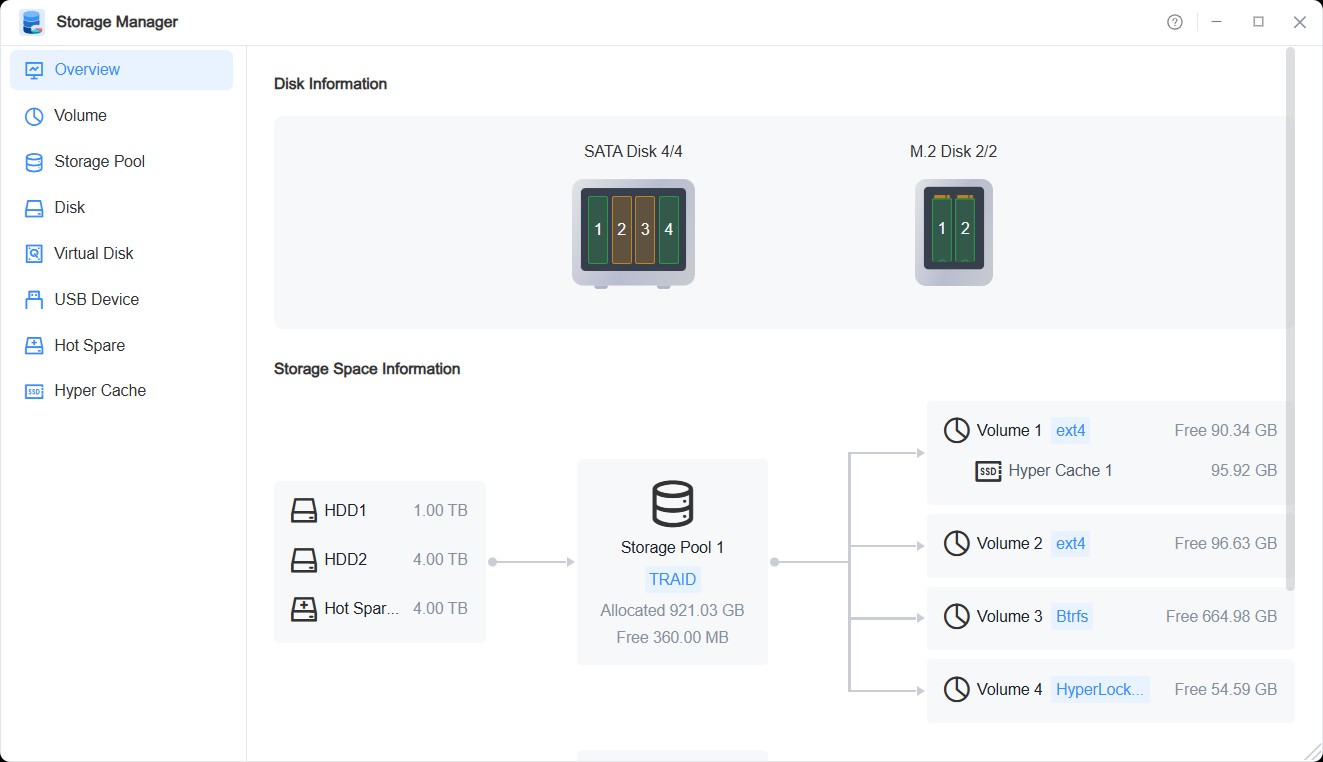
The Overview page displays TOS system disk information and storage space information, allowing you to view all relevant storage management information at a glance.
Disk Information
This section shows information about disks inserted in TNAS, including disk status and usage purpose. You can click Disks to navigate to the relevant page.
Disk Status Represented by Different Colors:
Color | Disk Status and Definition |
|---|---|
| Green | The disk is in Normal status, indicating that the disk is operating normally with no anomalies detected. |
| Yellow | The disk is in Warning status, indicating that disk read latency or S.M.A.R.T. anomalies have been detected. It is recommended to regularly back up relevant data and check the disk. |
| Red | The disk is in Error status, indicating that disk I/O errors or severe S.M.A.R.T. anomalies have been detected, which may lead to data loss. It is recommended to immediately back up relevant data and replace the disk. |
| Grey | Indicates Empty, no disk detected. |
Storage Space Information
This section displays storage space information in TNAS, including disk members in the storage pool array, volumes created in the storage pool, and their related data.
You can click Disks, Hot Spare Disks, Storage Pools, Volumes, SSD Cache to navigate to the corresponding pages.